Global Settings
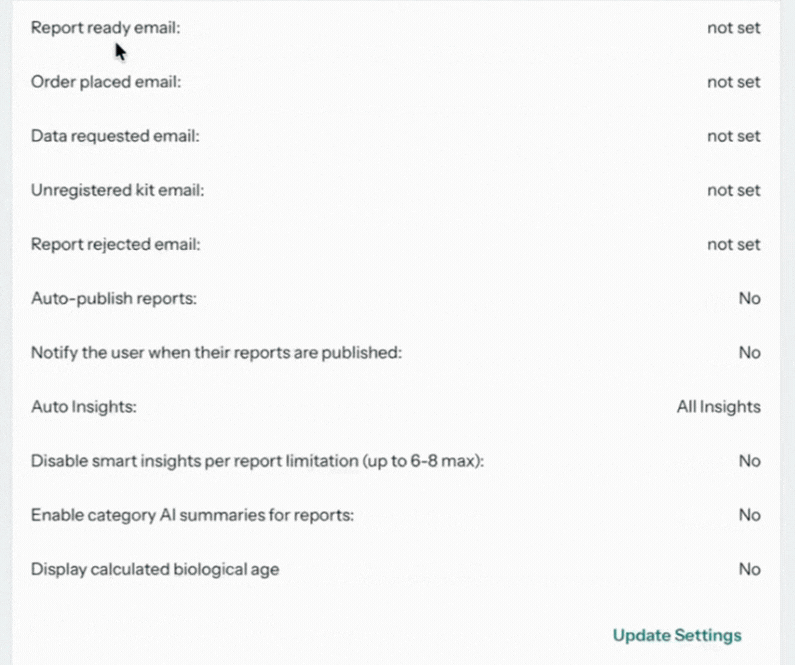
Global Settings on the dashboard home controls two things: who on your team is notified when something happens, and what happens to reports automatically once results return from the lab. Select Update Settings to change any value.
Notification emails
Each email setting names the address that receives that event's alerts. Enter a recipient for every event your team needs to hear about:
| Setting | Fires when |
|---|---|
| Report ready email | A user's results return from the lab and the report is ready for review |
| Order placed email | A new order is placed for your business |
| Data requested email | A data request needs your attention |
| Unregistered kit email | A kit needs registration before it can proceed |
| Report rejected email | The lab rejects a sample (see Sample rejection) |
Prefer machine-to-machine notifications? Webhook URLs are configured separately in the dashboard's API section; see Webhooks.
Report behavior
- Auto-publish reports: publish reports automatically when results return, removing the manual review-and-publish step for every report.
- Notify the user when their reports are published: email the test taker as soon as their report goes live.
- Auto Insights: automatically attach Insights to reports before publishing.
- Disable smart insights per report limitation: lift or keep the default cap (6 to 8) on smart insights per report.
- Enable category AI summaries for reports: add AI-written summaries per result category.
- Display calculated biological age: show the calculated biological age on user reports.
If you enable auto-publish, it usually makes sense to enable Auto Insights too, so published reports go out with insights already attached.
Download report data
From the dashboard you can Download a single file containing all your users' report data for a chosen period.
The exported file contains personal health information outside the two-factor-protected platform. Handle it accordingly: store it securely and delete it when no longer needed.